Powered by Eventfrog AI
Your event starts
with your words.
Type or say what you're planning.
Froggy will create your event for you.



How to create your event in the chat
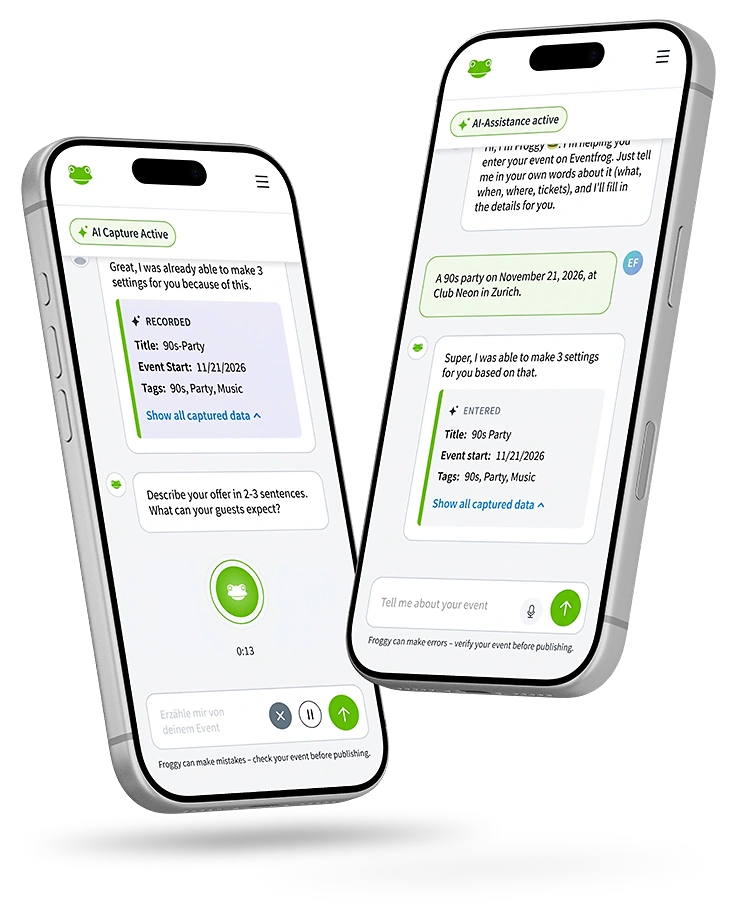
You provide the details and Froggy fills them in. You decide when your event goes live.
- Describe your event.
Choose AI event creation and tell Froggy what you're planning – by text or voice message. - Answer Froggy's questions.
If anything's missing, Froggy will ask. Reply in the chat or click one of the suggestions. - Review and publish.
Check your details. Once everything looks right, publish your event.



Frequently asked questions
Who is Froggy?
Froggy is Eventfrog's AI assistant. You describe your event in the chat and Froggy fills in your details and asks about anything that's missing.
Does AI event creation cost anything?
No. AI event creation is included in every event package at no extra cost. Listing your event in the event calendar is free too.
Do I need to know every detail of my event already?
No. Start with your idea and Froggy will ask about anything that's missing. Just make sure you've added all the required details before you publish.
Can I correct my details?
Yes. Tell Froggy in the chat what you'd like to change. You can then ask to see the details you've entered.
Will my event be published automatically?
No. Froggy creates a draft. You review the details and publish your event yourself.
Can I also enter my event using the form?
Yes. Choose manual entry or switch from the chat to the form at any point.